This is the workflow behind the featured storyboard video in Sogni Chat: GPT Image 2.5 plans every shot, then Seedance 2.5 shoots the whole film in one pass.
Step 1
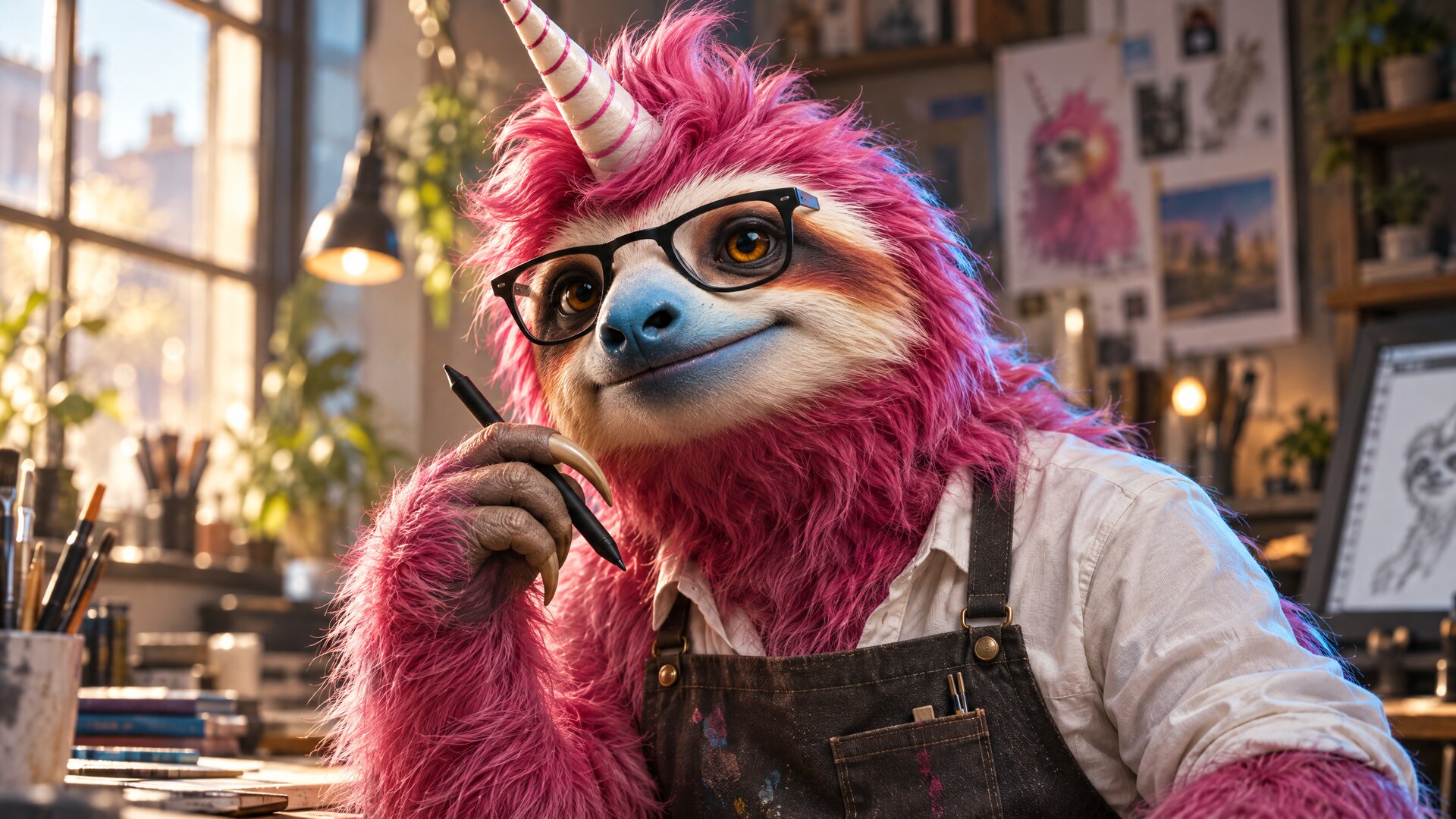
Lock the character with GPT Image 2.5
One photoreal identity plate of the pink Sogni sloth, rendered at 2560 × 1440 by GPT Image 2.5 from the original mascot art. Every later step references this face, fur, glasses and horn, so the character never drifts.
Step 2
Plan 36 shots on three storyboard sheets
GPT Image 2.5 lays out twelve numbered shots per 3840 × 2160 sheet, each with a timecode, medium and line of dialogue, using the plate as a reference so the same sloth appears in all 36 stills. Each sheet took about a minute and roughly 32 Spark.
Step 3
Render the film in one Seedance 2.5 pass
Seedance 2.5 takes the three sheets, the plate and the logo as @Image1 to @Image5 and renders a single 30-second 1920 × 1080 clip with the speech, sound effects and music generated together. About 8.5 minutes of render time.
Times are render time on the Sogni Supernet on 2026-09-16 and exclude queue time. The finished film is below, with all three sheets at full resolution.
New · Storyboard to 1080p · Featured workflow in Sogni Chat
Make Wild Art: a 30-second 1080p commercial from three storyboard sheets
Three GPT Image 2.5 storyboard sheets, one identity plate and one prompt became this 30-second Seedance 2.5 film at 1920 × 1080, with the dialogue, sound effects and 120 bpm score generated in the same pass. Play it with sound and watch the fur, glass and paint hold up as the sloth changes medium every three-quarters of a second.
1920 × 108030 s · 24 fps · native audio · one render
36 shotsplanned on three 3840 × 2160 storyboard sheets
~8.5 minrender time for the full 30-second clip
4,435 Spark ($22.18)list price for 30 s at 1080p · $0.74 per second
Seedance 2.5 · reference to video · 1080p · 30 s · native audio
Rendered in one pass from the three sheets below plus the identity plate and the Sogni logo. Watch for individual fur strands in the office, ridged oil paint on the wave, lantern paper on the dragon and the wet catchlights that survive every change of medium.
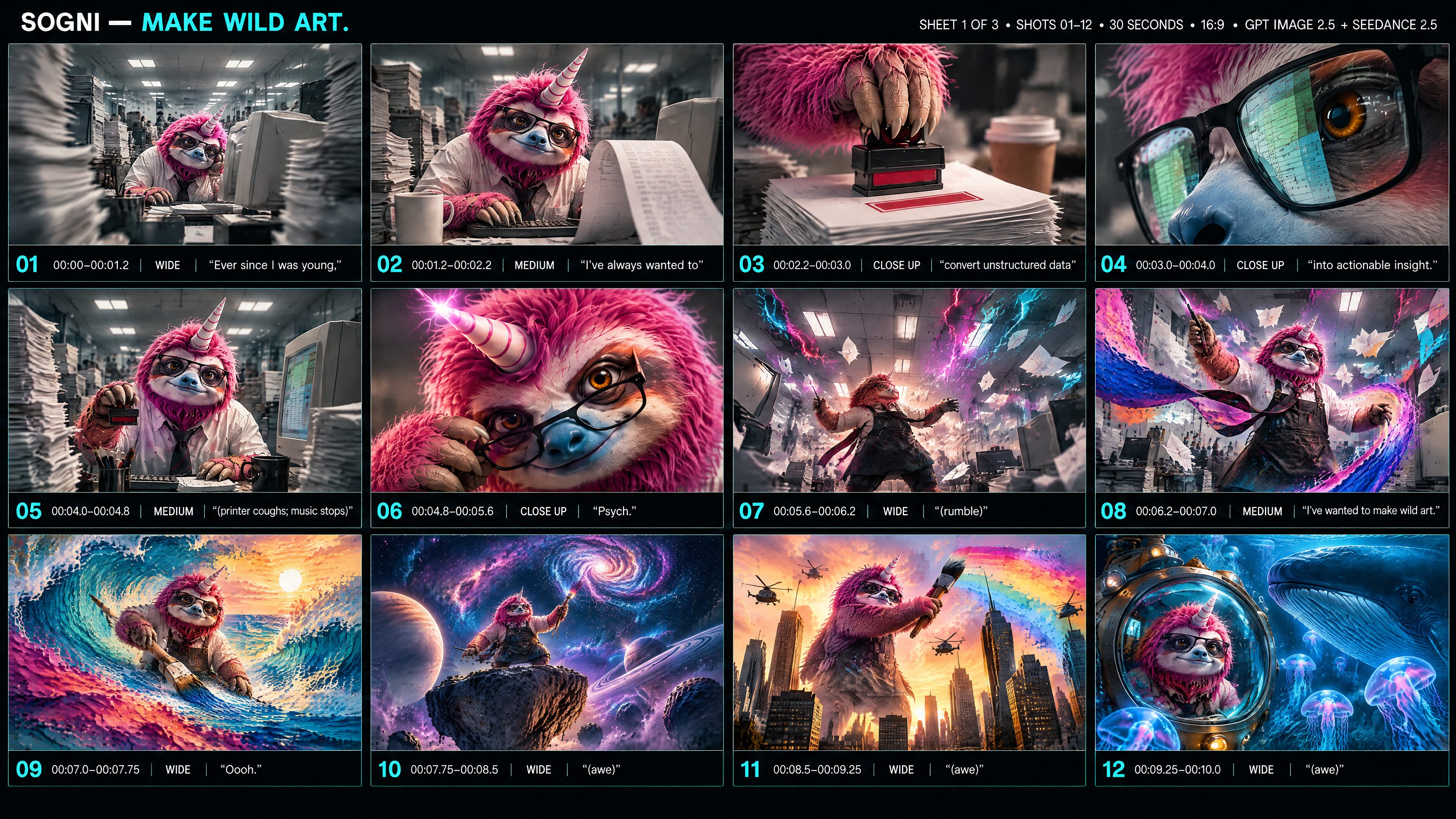
Sheet 1 of 3 · shots 01–12 · 00:00–00:10
The office set-up and the turn: eight brisk deadpan shots, the “Psych.” reveal, then the first wave of awe.
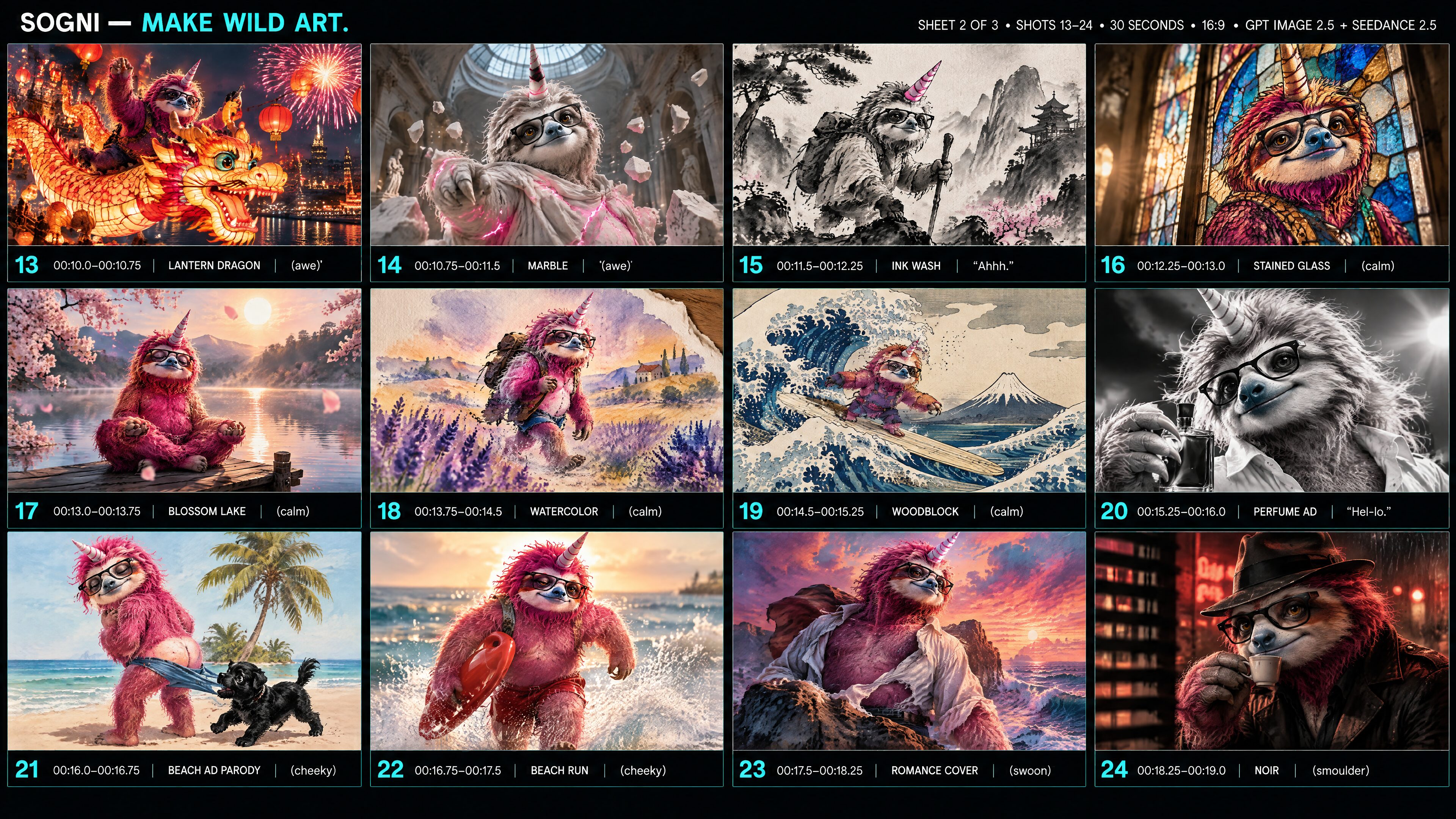
Sheet 2 of 3 · shots 13–24 · 00:10–00:19
Calm and cheeky glamour: marble, sumi-e ink, stained glass, watercolour, ukiyo-e, a black-and-white perfume ad, a 1950s beach poster and film noir.
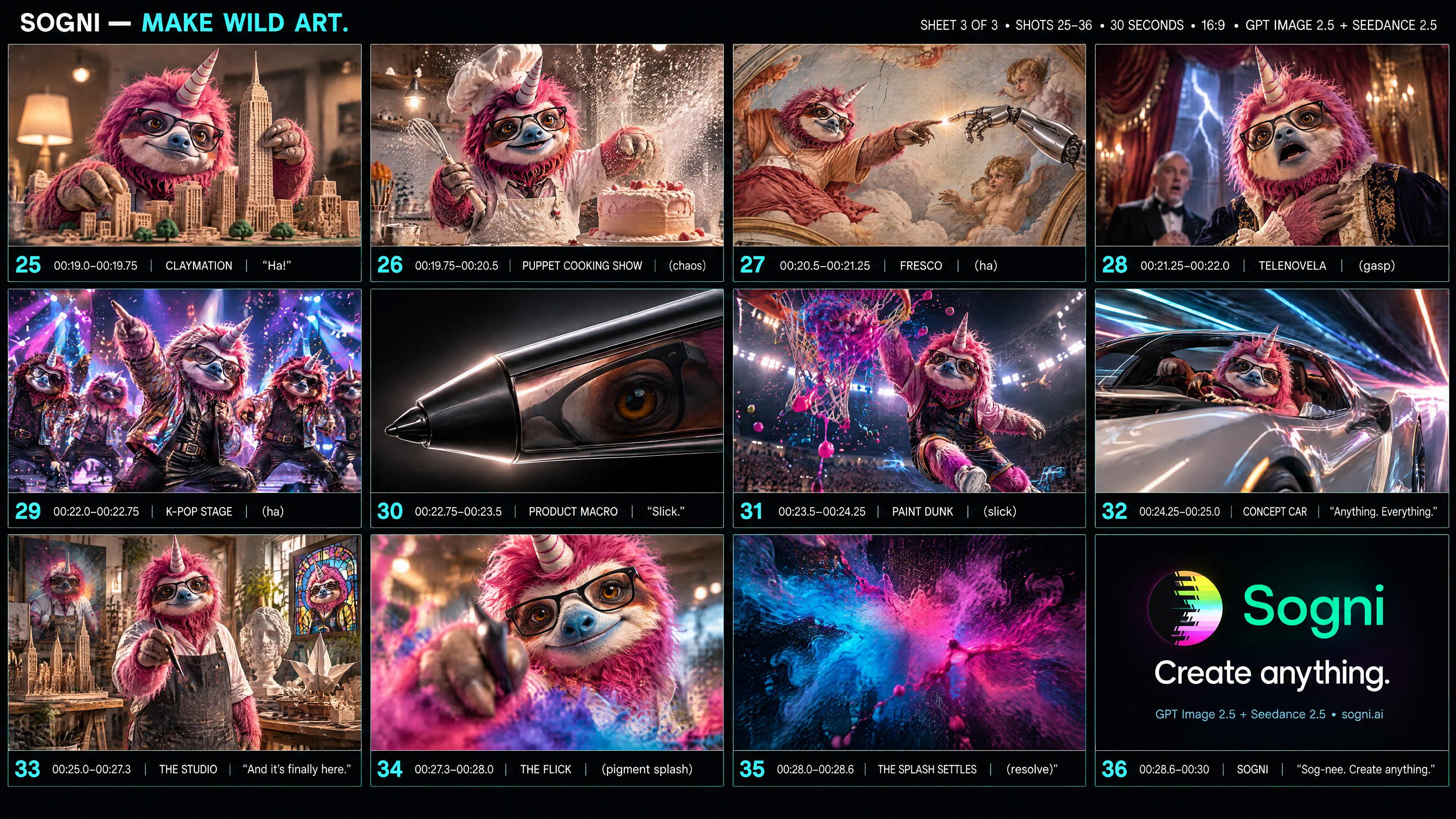
Sheet 3 of 3 · shots 25–36 · 00:19–00:30
Comedy, then polish: claymation, a puppet cooking show, a Renaissance fresco, telenovela, a K-pop stage, product macro, concept car, and the return to the studio for the brand line.
How the sheets drive the film
The sheets are references, not starting frames. The prompt tells Seedance 2.5 that @Image1 to @Image3 are one ordered 36-shot storyboard read left to right, then top to bottom; that @Image4 is the identity plate every shot must match; and that @Image5 is the logo for the end card. Seedance reads each cell as a composition, camera move and medium to shoot, so nothing on screen looks like a grid and no shot number or caption leaks into the picture.
Dialogue is timed in the prompt. Every spoken line carries a start and end timecode and a delivery note, and every transition after 00:07 is asked to land on a beat of a 120 bpm track. Seedance 2.5 generates the voice, the sound effects and the music together with the picture, so the “Psych.” vinyl stop and the beat drop arrive where the storyboard says they should.
Do it yourself. Describe the film in Sogni Chat and choose the featured storyboard workflow: GPT Image 2.5 draws the sheets, you approve them, and Seedance 2.5 renders the clip at up to 1080p. The GPT Image 2.5 page covers the sheet side; the verbatim video prompt is on the right.
The film above is the shipped cut: a “Psych.” title card and the exact Sogni end card were composited in post over the Seedance render. Everything else, including all speech, effects and music, is straight from the model.
The Seedance 2.5 prompt, verbatim
Create one finished 30-second 16:9 cinematic Sogni commercial with native synchronized speech, sound effects and music. @Image1 is sheet 1 of 3 (shots 01–12), @Image2 is sheet 2 of 3 (shots 13–24), @Image3 is sheet 3 of 3 (shots 25–36); together the sheets are one ordered 36-shot production storyboard, each read left to right then top to bottom, defining the shot order, composition, camera move, colour and medium of every shot. @Image4 is the PHOTOREAL IDENTITY PLATE of the one and only lead character: a real live-action pink-furred sloth with a striped unicorn horn, black rectangular glasses, amber eyes, pale blue muzzle and warm face markings. Every shot, in every medium, shows this exact character with this face; he is never replaced by a human, another animal or a generic character, and when a medium changes his silhouette, glasses, horn and face markings persist. @Image5 is the authoritative original Sogni logo for the final end card. The storyboards give compositions and sequence, not literal starting frames: every shot fills the screen with cinematic motion. Never display a storyboard grid, frame borders, shot numbers, timecodes, caption bands, subtitles, signs or production notes; no readable lettering anywhere except the end card; never pan across a sheet. No unrelated brand or partnership logos.

The narrative is an affectionate, mischievous joke about escaping corporate drudgery to make wild art, told as a relentless flowing commercial. Shots 1 to 8 are a brisk deadpan office set-up (about seven seconds) with the camera always moving. Shots 9 to 32 are a montage in which the same sloth is re-imagined in a new medium or genre about every three-quarters of a second, moving through waves of awe, calm, cheeky glamour, comedy and slick polish; shots 33 to 36 return to live action and resolve on the brand. Photographic realism throughout: real fur with individual strands, real glass, wet catchlights, believable hands and weight, and each named medium rendered as a physically real material (ridged oil paint, clay with fingerprints, leaded glass, paper grain) rather than a flat filter. The picture never hard cuts inside the montage: every shot hands off to the next through the motivated transition named for it (a wipe by an object crossing the lens, a push through a reflection or a pane, a whip pan, a bloom or flare that whites out and resolves, a morph in which one element becomes the next scene's element) while the camera keeps moving and the sloth keeps moving inside the frame. The music is a 120 bpm track and from 00:07 onward each transition lands on a beat.

The sloth is one consistent speaker with a warm, slightly raspy adult male voice: a brisk, upbeat, fast-talking advertising read with no dead air, dry corporate sincerity in the office and delighted confidence after the punchline, reacting to his own creations with short exclamations. All spoken words below are exact and are the only words spoken; pronounce the brand name exactly "SOG-nee". Clear speech in the foreground; duck the music under every line; synchronized mouth movement whenever his mouth is visible, narration otherwise. Do not add, repeat, paraphrase or truncate dialogue. Dialogue timing and delivery: 00:00–00:04.3 "Ever since I was young, I've always wanted to convert unstructured data into actionable insight." (brisk, upbeat, corporate-sincere, no pauses); 00:04.8–00:05.3 "Psych." (dry, then a grin); 00:06.2–00:07.3 "I've wanted to make wild art." (delighted, fast); 00:07.5–00:08.0 "Oooh." (awed); 00:11.5–00:12.0 "Ahhh." (soothed); 00:15.3–00:15.8 "Hel-lo." (cheeky, flirty); 00:19.0–00:19.4 "Ha!" (a bark of a laugh); 00:22.8–00:23.3 "Slick." (cool, admiring); 00:24.3–00:25.2 "Anything. Everything." (rapid, building); 00:25.6–00:27.0 "And it's finally here." (warm, inviting); 00:28.0–00:29.6 "Sog-nee. Create anything." (confident brand read; pronounce the brand exactly SOG-nee).

00:00–00:01.2 THE DREAM JOB: Fast dolly rushing down the cubicle aisle toward the sloth at his beige CRT, paper towers blurring past; the move never stops. Fluorescent hum, dull corporate piano.
00:01.2–00:02.2 THE DESK: Whip pan lands on the desk: the receipt spools into the foreground, he types with two fingers and glances into the lens.
00:02.2–00:03.0 THE STAMP: The camera rides the stamp down onto the report stack; the cup jumps on impact. Stamp thud.
00:03.0–00:04.0 THE SPREADSHEET: Push in until one lens fills the frame, spreadsheet cells scrolling across the reflection over his amber eye. Monitor whine.
00:04.0–00:04.8 THE SILENCE: Pull back to the dead-on medium shot, stamp frozen mid-air, deadpan to camera. The printer coughs once and the music stops dead.
00:04.8–00:05.6 PSYCH: Snap punch-in: glasses lowered, eyebrow up, grin, a hot-pink spark on the horn, a vinyl stop and a breath of silence.
00:05.6–00:06.2 THE CRACK: The spark cracks the whole office like glass: tubes flicker, walls split into cyan and magenta light, every sheet of paper lifts at once as he rises. Rising rumble.
00:06.2–00:07.0 THE RIP: Beat drop: he springs up and sweeps the stylus, walls tear into liquid paint, paperwork folds into origami birds, the tie becomes a paint ribbon over a charcoal apron, and the ribbon sweeps across the lens as a wipe. Bass hit, paint splash.
00:07.0–00:07.75 OIL WAVE (thick impasto oil paint, photographed): The wipe reveals a low tracking shot of him carving a giant paintbrush across an impasto oil wave; the crest curls over the lens.
00:07.75–00:08.5 COSMIC: The curl becomes a spiral galaxy; he drops onto a floating rock and conducts the stars under a ringed planet, aurora streaming.
00:08.5–00:09.25 KAIJU: The planet becomes the sunset behind a 300-foot sloth striding between skyscrapers, helicopters circling, painting the sky; the camera rises and dives into the reflection in his glasses.
00:09.25–00:10.0 DEEP SEA: Inside the reflection a glowing bathysphere descends with him at the porthole among giant jellyfish; a whale glides across the lens as a wipe.
00:10.0–00:10.75 LANTERN DRAGON: The whale's flank becomes a paper-lantern dragon he rides through fireworks over a night harbour, camera chasing; a bloom whites out the frame.
00:10.75–00:11.5 MARBLE (carved white marble, photographed): The bloom resolves as a museum skylight over his marble statue; cracks spread, pink light spills out as he stirs, and the cracks race to the lens and shatter.
00:11.5–00:12.25 INK WASH (sumi-e ink on rice paper): The shards land as ink drops on rice paper; strokes form him walking a misty mountain path; the ink blooms across the frame.
00:12.25–00:13.0 STAINED GLASS (leaded stained glass, photographed): The bloom becomes sunlight through a stained-glass window of him; the camera dollies in through the beams and pushes through a pane.
00:13.0–00:13.75 BLOSSOM LAKE: Through the pane: slow-motion petals over a mirror lake at dawn, him meditating on a dock as the camera orbits; a petal lands and the ripple wipes the frame.
00:13.75–00:14.5 WATERCOLOR (wet watercolor on paper): The ripple bleeds into wet watercolor: he strides through a lavender field as the pigments run; the paper tears from a corner.
00:14.5–00:15.25 WOODBLOCK (edo-period ukiyo-e woodblock print): Behind the tear, an ukiyo-e print: he surfs the crest of a great wave; the foam curls over the lens.
00:15.25–00:16.0 PERFUME AD (black-and-white fashion film): The foam becomes his wind-blown fur in a black-and-white perfume ad; he is the model, slow motion, eyebrow raised at the lens; a flare whites out the frame.
00:16.0–00:16.75 BEACH AD PARODY (1950s painted beach poster): From white, a 1950s painted beach poster: the sloth glances back in surprise as a small black puppy tugs his blue swim trunks down to show a paler fur tan line; the puppy bounds toward the lens.
00:16.75–00:17.5 BEACH RUN: The leap becomes slow-motion surf: he jogs out of the waves in red trunks with a rescue float, smirking; spray hits the lens.
00:17.5–00:18.25 ROMANCE COVER (painted paperback romance cover): The spray becomes painted foam on a romance-novel cover: windswept hero on a sea cliff, shirt torn open, mane streaming; the wind whips it into rain.
00:18.25–00:19.0 NOIR (film noir): The rain streaks a noir window; blind shadows sweep across him in a fedora sipping espresso, red neon, a sultry look; the blinds close across the frame.
00:19.0–00:19.75 CLAYMATION (stop-motion plasticine, photographed): The blinds open on a tabletop where a clay version of him sculpts a city that pops up building by building, camera craning up; a tower rises into the lens.
00:19.75–00:20.5 PUPPET COOKING SHOW (felt hand puppet): The tower becomes a wobbling cake on a chaotic cooking show; the felt-puppet sloth flails as flour explodes toward the lens.
00:20.5–00:21.25 FRESCO (renaissance ceiling fresco): The flour settles as plaster dust on a ceiling fresco: he reaches a fingertip toward a robot's fingertip, cherubs peeking, camera tilting up; the fingertips touch and spark.
00:21.25–00:22.0 TELENOVELA: The spark becomes lightning behind velvet curtains: crash-zoom on him gasping with a hand to his chest, a shocked butler behind.
00:22.0–00:22.75 K-POP STAGE: The lightning becomes stage strobes: a sharp dance move with four backup-dancer sloths on a neon stage; confetti cannons fire at the lens.
00:22.75–00:23.5 PRODUCT MACRO: The confetti settles into a matte-black product studio: macro of the stylus rotating, a light sweep travelling its edge, his eye in the reflection; the sweep wipes the frame.
00:23.5–00:24.25 PAINT DUNK: The sweep becomes arena lights: slow-motion dunk of a liquid-paint basketball, camera under the rim, droplets frozen; the splash hits the lens.
00:24.25–00:25.0 CONCEPT CAR: The streaks become a tunnel of light: he drives a sleek concept car as the camera pulls ahead; the car drives into the lens flare.
00:25.0–00:27.3 THE STUDIO: The flare clears on a continuous pullback in a warm artist studio as he steps toward the lens with the stylus, his creations from every medium arranged around him. The music resolves.
00:27.3–00:28.0 THE FLICK: Close: he flicks the stylus at the lens with a grin and a splash of coral, cyan and violet pigment bursts toward the camera.
00:28.0–00:28.6 THE SPLASH SETTLES: The splash fills the frame and settles, slowing and darkening toward near-black with a soft cyan and pink glow.
00:28.6–00:30 SOGNI: The glow resolves into a near-black end card with the exact Sogni logo, one line "Create anything." and a small footer "GPT Image 2.5 + Seedance 2.5 • sogni.ai", held steady to the end.

Music: a dull corporate piano under the office that stops dead at 00:04.0, a vinyl stop on "Psych.", a rumble on the crack, then an energetic 120 bpm beat drop at 00:06.2 that lands a hit on every transition through the montage, resolving into a warm brand chord over the studio and end card. Finish the last spoken word by 00:29.6 and leave a short clean sonic resolve. No fade to an empty screen before the end. The end card carries only the logo, the single line and the small footer named above.
Rendered on 2026-09-16 with Seedance 2.5 at 1920 × 1080, 30 seconds, 24 fps, seed 685373305, from five reference images and no reference video or audio. Render time excludes queue time. The list quote was 4,435 Spark ($22.18); the account's Unlimited Pro discount brought the billed cost to 3,992 Spark ($19.96).
About
Seedance 2.5 is ByteDance's mainline video generation model, served through BytePlus ModelArk. It renders 4 to 30 second clips at a fixed 24 fps and generates native audio in the same pass.
Its Reference to Video workspace now exposes three explicit modes. Create makes a new clip from loose references. Edit transforms @Video1 while preserving everything you do not ask to change; the output follows the source video's duration and aspect. Extend continues @Video1 after its ending; the aspect follows the source while you choose a new 4 to 30 second continuation.
Seedance 2.5 accepts up to 30 reference images, 10 reference videos, and 10 reference audio clips — 50 media parts total. Edit and Extend require a source video as @Video1, and you can still use the wider reference stack to guide identity, environment, motion, or sound.
Seedance 2.5 is the latest Seedance generation and the recommended default for current storyboard workflows. It doubles the maximum clip length, widens reference input, and renders up to 1080p. Seedance 2.0 remains available when a 4K master is required.
Prompting tips
Choose the reference mode first, then make @Video1's role explicit in the prompt.
Create — Assign each attached image, video, or audio a role, then describe the new scene. Example: Use @Image1 for the character, @Image2 for the location, and @Video1 for camera movement.
Edit — Start with ‘Edit @Video1.’ State exactly what should change and what must remain, such as cast, motion, framing, timing, or soundtrack.
Extend — Start with ‘Extend @Video1 after its ending.’ Describe only the continuation, then restate the identity, lighting, camera language, pacing, and audio continuity to preserve.
In Edit and Extend, the first attached video is the source or continuation anchor. Edit inherits its duration and aspect; Extend inherits its aspect and uses the continuation duration you select.
Reference modes: Create, Edit, Extend
The mode is fixed before generation so the same reference video cannot be ambiguously interpreted after billing.
Mode
Required input
Output behavior
Create
At least one loose image, video, or audio reference
A new 4–30 second clip guided by the attached media
Edit
@Video1 as the source; optional supplemental references
Transforms the source; duration and aspect follow @Video1
Extend
@Video1 as the continuation anchor
Continues after the ending; aspect follows @Video1, with a new 4–30 second duration
Photos and clips of real people
Seedance 2.5 accepts your own likeness, or that of people who gave you explicit, legal consent, once your account accepts a one-time likeness agreement in the Sogni app. Without it, Seedance 2.5 refuses a photo or video that may contain a real person. It is the one agreement for Seedance video generation models, so if you already accepted it, you are covered. For mature themes, use Seedance 2.5 Uncensored below.
Best likeness. Likeness holds best in Reference to Video, with the person's photo attached as a reference, for example Use @Image1 as the presenter. Image to Video, with the photo as the first frame, can drift away from the face on big head turns.
API and SDKs. The agreement belongs to your account, so once you accept it in the Sogni app, seedance-2-5 jobs through the API and SDKs accept real people too.
Seedance 2.5 Uncensored
Seedance 2.5 Uncensored (model ID seedance-2-5-uncensored), also known as Seedance 2.5 Spicy, is Seedance 2.5 with every capability and limit on this page, on a more permissive content policy for mature themes. Standard Seedance 2.5 declines mature prompts.
Mature themes. Seedance needs detailed reference images or videos that show the anatomy and actions you want. Wan 3 Uncensored needs far less guidance and usually just works. Seedance 2.5 Uncensored is the more powerful model and costs more, but it is harder to steer for mature themes.
Where to find it. At app.sogni.ai it appears beside Seedance 2.5 in the Seedance workflows while the Sensitive Content Filter is off (18+). Through the API and SDKs use seedance-2-5-uncensored, or seedance2-5-uncensored in Creative Agent workflows and the Creative Agent Skill. Accept the same one-time likeness agreement once in the Sogni app first; until then, jobs are refused with error 4103 and nothing is charged.
Seedance 2.5 Uncensored pricing
Seedance 2.5 Uncensored comes at a premium rate above standard Seedance 2.5. It is paid with Premium Spark on every plan, with 5% off for Unlimited and 10% off for Unlimited Pro.
Resolution
Per second
5 seconds
30 seconds
480p
30.84 Spark ($0.154200)
154.2 Spark ($0.77)
925.2 Spark ($4.63)
720p
69.34 Spark ($0.346680)
346.68 Spark ($1.73)
2,080.08 Spark ($10.40)
1080p
170.59 Spark ($0.852930)
852.93 Spark ($4.26)
5,117.58 Spark ($25.59)
Without a reference video. With one, the reference seconds and output seconds bill at one lower per-second rate: a 15-second reference plus 15 seconds of 720p output bills as 30 seconds, about 1,244 Spark ($6.22), versus 1,040 Spark ($5.20) for 15 seconds without one.
Pricing
Seedance 2.5 is a pay-as-you-go Premium Spark vendor model. Every clip uses Premium Spark (bought or awarded, never Free Spark), including for Sogni Unlimited members. Unlimited saves 5%; Unlimited Pro saves 10%.
Configuration
Spark
USD
5 s · 480p · no video reference
134 Spark
$0.67
30 s · 480p · no video reference
802 Spark
$4.01
5 s · 720p · no video reference
300 Spark
$1.50
10 s · 720p · no video reference
601 Spark
$3.00
5 s · 1080p · no video reference
739 Spark
$3.70
30 s · 720p · no video reference
1803 Spark
$9.01
30 s · 1080p · no video reference
4435 Spark
$22.18
Rows marked no video reference cover output only; video-reference rows include the input and output durations shown. With a video reference, each clip charges for input-video seconds plus generated output seconds at this model’s with-video rate. Add all reference-video durations, including fractional seconds; reusing the same reference for another clip adds the input charge again.
Per-second Premium Spark rates: $0.739206 per second at 1080p, $0.300456 per second at 720p, and $0.133640 per second at 480p. Totals are billed from those exact rates.
With a reference video, the reference seconds bill at the same per-second rate as the output seconds, since reading a reference takes about as much GPU time as generating the same length. That rate is lower than the rates above, but the job costs more in total: a 15-second reference plus 15 seconds of 720p output bills as 30 seconds, about 1,078 Spark ($5.39), versus 901 Spark ($4.51) for 15 seconds without one. Input counts as at least two-thirds of the output duration, rounded up to a whole second. The quote before rendering assumes a 30-second reference, and 30 seconds of output; the final charge settles to provider-confirmed usage, including minimum billable usage.
API
One Sogni API key reaches every model in the catalog — call Seedance 2.5 with the exact model id.
import { SogniClient } from '@sogni-ai/sogni-client';

const client = await SogniClient.createInstance({
  appId: crypto.randomUUID(),
  apiKey: process.env.SOGNI_API_KEY,
  network: 'fast',
});

const project = await client.projects.create({
  type: 'video',
  modelId: 'seedance-2-5',
  positivePrompt: 'a slothicorn surfing a wave of liquid paint, slow push-in, cinematic',
  numberOfMedia: 1,
  duration: 5,
});

const [url] = await project.waitForCompletion();
console.log(url); // result link — download within 24h
REST workflow alias: seedance2-5. Pin the exact id with the SDK. Full reference at docs.sogni.ai.
Made on Sogni
See what Seedance 2.5 makes
One 15-second motion-driven mascot edit became the control for a second 30-second edit: first the pink Sogni sloth replaces the source dancer, then the same mascot performs the choreography as a green-screen partner beside a live-action creator. Play both with sound and compare identity, plush body volume, motion fidelity, and beat synchronization.
Identity reference · @Image1
The original brand still used as the sole authority for the mascot's face, glasses, horn, fur, colors, and broad plush build in both edits.
Edit · Mascot replacement
Edit @Video1 into a single continuous 15-second vertical 9:16 parody. @Video1 is the sole authority for the exact choreography, timing, pose sequence, camera, full-body framing, royal-blue background, beat synchronization, and original soundtrack; preserve all of those from start to finish. Replace the dancing subject with the pink fuzzy Sogni sloth-unicorn mascot from @Image1. Keep its bright magenta layered fur, pale sloth eye mask and muzzle, sky-blue nose, amber eyes, black rectangular glasses, one white horn with pink spiral bands, and broad, stocky, plush, round-bellied physique consistent through every pose. Transfer @Video1's motion with believable weight shifts, stable anatomy, natural fur secondary motion, and every dance accent synchronized to the preserved audio.
Edit @Video1 into a single continuous 30-second vertical 9:16 TikTok-style green-screen dance duet. Preserve @Video1's exact choreography, pose sequence, rhythm, timing, camera, and original soundtrack. Place an ordinary casually dressed adult creator full-body on the left in a slightly cluttered apartment and the pink fuzzy Sogni sloth-unicorn from @Image1 full-body on the right as a cleanly keyed digital partner. Keep the mascot broad, stocky, plush, round-bellied, and recognizable, with one horn, one pair of glasses, stable anatomy, and generous fur volume. Both performers execute the same choreography in unison, matching every lean, cross, step, bounce, and beat accent while the source audio stays synchronized from start to finish.
Seedance 2.5 is a third-party frontier model. It uses Premium Spark for every clip; Unlimited plans discount those pay-as-you-go rates instead of covering them as fair-use renders.
◆
Premium Spark required
Vendor-backed renders are billed with Spark even when your account has an active Unlimited subscription.
%
Subscriber discounts
Unlimited saves 5%; Unlimited Pro saves 10%.
↗
App and API
Launch Seedance 2.5 from the Sogni app or call the exact model id through the API.
⚡
One workspace
Use premium vendor models alongside Sogni Supernet image, video, music, and language models.
Choose Seedance 2.5 for the latest generation, 4 to 30 second clips, up to 30 images, 10 videos, and 10 audio references, and output up to 1080p. Choose Seedance 2.0 when the job specifically requires 4K.
What can Seedance 2.5 take as input?
Text on its own; a first frame, or a first-and-last-frame pair, for image-to-video; and up to 30 loose images, 10 videos, and 10 audio clips for Create, Edit, and Extend reference modes, with 50 media parts total. Audio-only reference creation is supported.
How do Seedance 2.5 Edit and Extend differ?
Both require a source video as @Video1 and inherit its aspect ratio. Edit transforms the existing timeline and automatically follows @Video1's duration, up to 30 seconds. Extend starts after @Video1 ends and uses a new continuation duration you choose from 4 to 30 seconds.
How do I select Create, Edit, or Extend through the API?
Set seedanceTaskType to reference, edit, or extend on a seedance-2-5 video project. Edit and Extend require at least one reference video; the first attached video is @Video1. Omit seedanceTaskType for first-frame and first-plus-last-frame generation.
Can Seedance 2.5 animate a photo of a real person?
Yes, once your account accepts a one-time likeness agreement in the Sogni app: your own likeness, or that of people who gave you explicit, legal consent. Without it, Seedance 2.5 refuses photos and videos that may contain a real person. Attach the photo as a reference in Reference to Video for the best likeness.
Does Seedance 2.5 generate audio?
Yes. Seedance 2.5 generates native audio as part of the same pass, at a fixed 24 fps.
Can Seedance 2.5 render 1080p or 4K?
Seedance 2.5 renders 1080p as well as 480p and 720p. It does not render 4K; use Seedance 2.0 when 4K is required.
Will Seedance 2.5 be added to the Sogni Unlimited Plan?
Not currently. Seedance 2.5 is not an open-weight model, so Sogni cannot run it directly on Supernet worker GPUs. We provide it through the third-party BytePlus ModelArk API, which charges Sogni per render, so Seedance 2.5 must remain pay-as-you-go. Unlimited members save 5% and Unlimited Pro members save 10% on those rates. ByteDance has not provided a forecast for whether or when Seedance 2.5 will become open weight; if it becomes available to run on Sogni worker nodes, we will add it to Unlimited. Until then, MiniMax H3 and Wan 2.2 are excellent open-weight video alternatives included with Unlimited.
Can I reuse a saved Persona in a video?
Yes. Save photos, a character sheet and a voice recording in Personas in Sogni Create, then choose the Persona in Reference to Video. Its supported photos and saved voice are added within the model’s reference limits. The AI Screenwriter also uses the details you saved for the character. The same Personas are available in Sogni Chat.
Can I plan a video with keyframes?
In Sogni Create’s Reference to Video, choose uploaded image references and the moments they should guide. Your image and timing guidance is sent with the prompt to plan opening, intermediate and ending compositions.
Do video references add to the price?
Yes. R2V with video references charges for processing the combined input-video seconds as well as generating the output, for every clip. Both use the selected model’s with-video rate, which differs from the no-video-input rate. Image-only and audio-only references do not add video-input seconds. Seedance quotes reserve the maximum input duration (15 seconds for 2.0 tiers, 30 seconds for 2.5 tiers); 2.5 estimates also reserve 30 seconds of output. Final charges settle to provider-confirmed usage, including minimum billable usage. This also applies to the Uncensored tiers.
Start with Seedance 2.5 today
Create in the app, or build with the API. Your call.